 Forma
Guide › Start here
What Forma is for
The idea in one page.
Forma helps you train, eat and recover while asking you for very little. You log what you did — a meal, a set, a weigh-in — and Forma works out what to do next: today's session, your calorie and protein target, and when to rest.
When to use it
- You want to train and eat well, but you do not want to plan every session and every meal yourself.
- You want a plan that comes from your own numbers, not from generic advice.
- You want your logs to stay on your phone, with no account to create and no tracking.
Step by step
Forma runs on a short daily loop.
- Log what you did: a meal on Fuel, a set on Train, a weigh-in on Today. Apple Health can bring the reading in from a connected scale, so you do not have to type it.
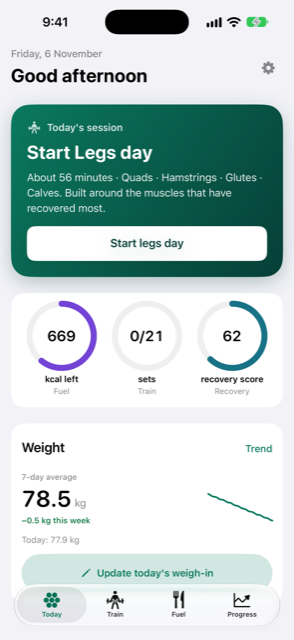
- Open Today and read the big card near the top. It shows the next thing to do. That can be a check-in, a session to start or resume, a meal to log, a weigh-in to add, or a rest day to call.
- Tap the button on the card and do that one thing. The check-in asks how rested you feel, on a scale from 1 to 10 (Exhausted to Great). A session card takes you to Train. A meal card takes you to Fuel.
- Come back the next day. Your targets, the weights to lift and your rest days are worked out again from what you logged.
Good to know
- The first time you open Forma, you see a short setup before this loop starts. After that, Forma opens on Today.
- At the top of Today you see the date and a greeting. Below it is the big card for the next thing to do.
- Under the card are three rings: Fuel for the calories you have left today, Train for your session, and Recovery for how ready your body is.
- Under the rings is the Weight card with your 7-day average, a small chart and an Add weigh-in button. Tap Trend on that card to see the full picture on Progress.
- Near the top right are the gear button, which opens Settings, and a speech-bubble button labelled Ask Coach. Answering is part of the optional Forma Power extras; without it the button opens the plans.
- Targets, session plans and rest days come from tested calculations that run on your phone. An AI never produces them.
- Your data stays on this phone, with a backup in your own iCloud. There is no account and no tracking. Only the optional Forma Power extras (watch connection, online AI) use Forma's server.
- Decisions use your 7-day average weight, not a single weigh-in. Your first reading starts the average. Single readings are kept for the record.
Related
Something unclear or missing? Write to support@raveniq.ai and say which page.