 Forma
Guide › Start here
The four tabs
What lives where: Today, Train, Fuel, Progress.
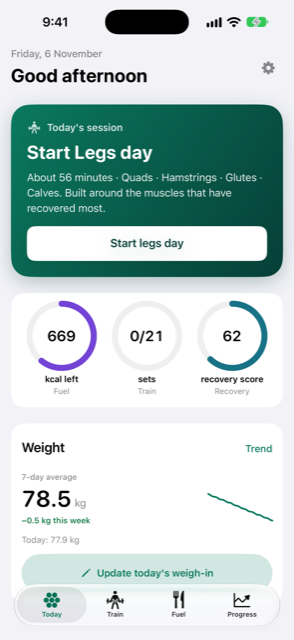
Forma has four tabs: Today, Train, Fuel and Progress. Each holds one part of your day, so you always know where to look.
When to use it
- You are new to Forma and want to know what lives where.
- You are looking for something — a log, a chart, the Exercise library — and want to find it quickly.
- You turned a coach on or off and want to know what changed on screen.
Step by step
Here is what each tab holds. Tap a tab name to switch between them.
- Open Today. It is your day at a glance. Above the rings is the big card for the next thing to do: a check-in, a session, a meal, a weigh-in or a rest day. Three rings sit below it: Fuel (calories left), Train (your session) and Recovery. Tap the Fuel ring to open Fuel, the Train ring to open Train, or the Recovery ring to open Progress. Under the rings is your weight trend.
- Open Train. It holds today's session, your week, the Exercise library and Injuries.
- Open Fuel. It shows what you ate today, your target, Your week, and Supplements.
- Open Progress. It starts with your weight verdict and chart: a short line on how your weight is moving, and the chart behind it. Below that is one card, Your body & training, with Strength, Recovery, Body and the Fitness score.
Today in detail
The top row of Today shows the date and a greeting. The gear at the top right opens Settings. Next to it, a speech-bubble button opens Ask Coach, where you can ask a question about your training and eating. Answering is part of the optional Forma Power extras; without it the button opens the plans.
The Weight card shows your 7-day average with a small chart. Tap Trend on it to see the full picture on Progress, or Add weigh-in to add a reading. If the Morning check-in is due, it appears as the big card: slide to how rested you feel and tap Save.
Good to know
- Train appears when the training coach is on, and Fuel when the diet coach is on. Both are on to start with; change it in Settings > Coaches.
- Each ring belongs to a coach: Fuel to the diet coach, Train and Recovery to the training coach. With one coach off, its ring is not drawn.
- Train and Progress each have a clock button that opens History & reports: your past sessions and your reports.
- If a backup has been failing or missing for three days, a small dot appears on the gear. The details are in Settings, under Data & backup.
Related
Something unclear or missing? Write to support@raveniq.ai and say which page.