 Forma
Guide › Progress
The Fitness score
What goes into it and how to read it.
The Fitness score is one number out of 10 that summarises how your training, body and habits have been going lately. It is built from your own logged numbers in Forma.
When to use it
- Once a week or so, as a slow-moving check that you are heading the right way.
- When the separate screens give mixed signals and you want the overall picture.
- When you want to know which one area is holding you back most.
- When an area has no data yet: the screen says so instead of showing a made-up number.
Step by step
- Open the Progress tab.
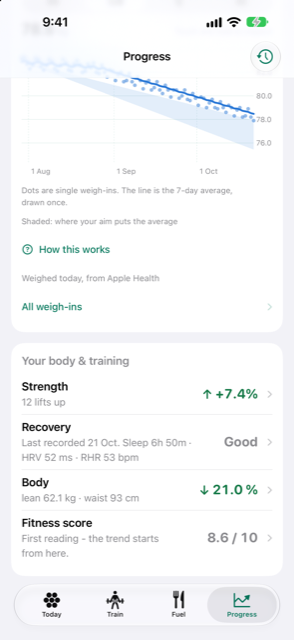
- In the Your body & training card, tap the Fitness score row. The row appears only once at least one domain has a score; early on it may not be there yet.
- Read the top card: the score out of 10, a band label under it, and one line on how it has moved.
- Look at the four domain cards - Fitness, Strength, Body and Behaviours - each with its own score and the areas inside it.
- Open the How this works section on the screen at any time for the rules described below.
- Check Weekly snapshots to see the score week by week. One snapshot is saved each week; after the second one, a trend line appears.
What goes into it
Every area is scored 0 to 100 and shown out of 10. Each area looks at the last 28 days, and the four domain scores are a plain average of the areas inside them. The headline score is the plain average of the four domains, and all four must have a score before any headline appears. Until then the screen says "Not enough measured yet" and names which domains it is waiting for.
| Domain | Areas it averages |
|---|---|
| Fitness | Fitness (VO2 max against what is typical for your age and sex), Heart (resting heart rate) |
| Strength | Strength (how your lifts are trending) |
| Body | Body (body fat, or BMI, or a holding note), Weight trend (or Composition trend from scans) |
| Behaviours | Activity, Sleep, Nutrition (protein) |
Nothing is weighted or adjusted behind the scenes: the average really is an average.
How to read it
Each area shows either a score with a supporting fact, or a dash with a short "Waiting:" line saying exactly what it needs:
- Sleep and protein also use the last 28 days and need at least 7 nights, or 7 logged days, before they count.
- Heart needs a few resting heart rate readings.
- Fitness needs a VO2 max reading, and your age and sex in your profile.
- Strength needs a lift logged on two different days to have a direction.
- Activity needs active-minutes data; from Garmin it comes from intensity minutes.
- Weight trend needs a goal set and weigh-ins in the last 4 weeks and in the 4 weeks before, so there is something to compare.
- Body works from a body-fat reading or a clinic scan. If you have neither, it falls back to BMI from your height and recent weigh-ins.
An area can also be waiting because a reading is too old. A body-fat reading or clinic scan older than 120 days stops counting and shows as out of date. Forma uses your weight pace instead, and prefers a clinic reading over a scale reading when both are recent.
The band label sorts scores into Strong, Good, Fair, Building and Just starting. The body-fat and BMI scores slide smoothly along their scale, so a tenth of a point on your body fat never changes your score by much.
Good to know
It moves slowly on purpose. The last 28 days feed every area, and one snapshot a week is kept. A bad weekend does not dent it; a lost month does.
On a cut, holding is winning. When your goal is a cut, keeping your lifts about where they were - down no more than 2% - scores Good or better for Strength. If your lifts rise, the score rises as usual. Outside a cut, Strength follows your lift change directly.
How change is counted. The three-month change shown with the score counts only areas that had a score at both dates. An area that merely appeared is not an improvement, and one that vanished is not a decline.
Related
Something unclear or missing? Write to support@raveniq.ai and say which page.