 Forma
Guide › Start here
Core and Power
What is on your phone for everyone and what Power adds.
Forma comes in two levels, Forma Core and Forma Power. You subscribe to one of them, monthly or yearly, and you can move between them at any time. Both keep your data on the phone; the difference is only what talks to Forma's server.
Core, for everyone
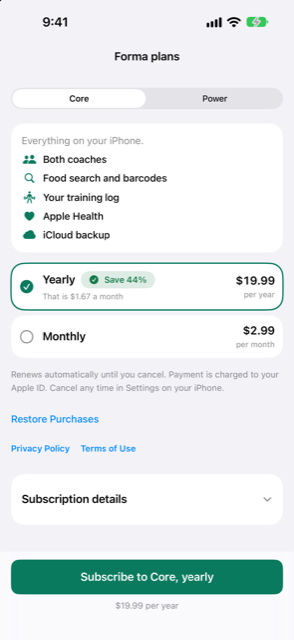
Core is all of Forma on your iPhone. Nothing about it needs an account or a connection to Forma's server. With Core you get:
- Both coaches — a training coach and a diet coach, each working from your own numbers.
- Food search and barcodes — search foods, scan a barcode or type it in. The bundled food table works offline.
- Your training log — sessions, sets, progression and rest, with every lift's history.
- Apple Health (optional) — weight, body composition, sleep, heart-rate variability and resting heart rate, read on your phone.
- iCloud backup — a copy in your own private iCloud, and one before it.
Power, the step up
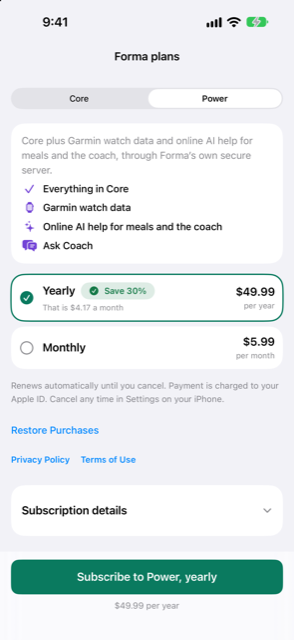
Power is Core plus three things, all delivered through Forma's own server:
- Garmin watch data — sleep, heart-rate variability and activities from your Garmin, in your coaching.
- Online AI help for meals and the coach — read a meal photo, estimate a meal you describe, and word the coach's messages. Only when you allow it, and never with watch data.
- Ask Coach — ask your coach a question in your own words.
Everything else stays in place.
Online AI is your choice
Online AI help is off until you turn it on, and a sheet explains exactly what is sent and where before you can. You can switch it off again at any time. Switching off takes effect at once, even for photos still waiting to be read. Your watch data is never sent to the AI service.
When to use it
- You finished the 14-day free trial and want to know what to pick.
- You are being asked on Today to subscribe (or to consider Power), and want the short version.
- You already have a plan and want to move up or down.
Step by step
- Open Settings, then Subscription. The screen shows where your trial stands: days left in the free trial, or if it has ended, what still works.
- Tap See plans (once you have a plan, that row reads See all plans). The screen opens with the title Forma plans.
- Pick Core or Power with the switcher at the top. Each shows one short list of what is in it, in plain language.
- Choose Yearly or Monthly from the plan cards. The price shown next to each option comes from the App Store.
- Tap the subscribe button at the bottom. Its words name your choice, for example Subscribe to Core, yearly, or Upgrade to Power, yearly if you already have a plan. Confirm with the App Store.
- On a new phone, use Restore Purchases to bring your subscription back. Manage Subscription opens the place under your Apple ID where you can change or cancel.
What happens without a plan
If the trial or a subscription ends, Forma becomes read-only.
What still works
- Your history, charts and settings.
- Export, backup, restore, and Delete all my data.
- A workout you have already started can still be finished.
What pauses
- Logging new food, workouts, weigh-ins or check-ins.
- The coaches, reminders and widget updates.
Nothing you logged is touched, and subscribing again resumes everything where it left off.
Related
Something unclear or missing? Write to support@raveniq.ai and say which page.